Complaints management
Design Process
Overview
The project's goal is to create a Complaints Management web tool where the users can create and manage colossal complaint databases from the legacy system.
UX and UI Contributions:
-
Created persona, journey map and process flow map.
-
Proposed features and functionalities to align the user context.
-
Proposed new and improved solutions to solve usability issues and fill gaps.
-
Created task flow to eliminate redundant and unwanted looping steps and replace human effort with the machine.
-
Created wireframes.
-
Created Visual design.
Tools
XD, Figma, Fig Jam, Miro
Discover
Business objective
Based on the discussion with the product owners and BAs, the following business objective were defined
-
Create and manage a large volume of complaints from the legacy system.
-
Automate approval processes.
-
Build efficacy in the processes
Key problem to solve for user
-
Prevent error
-
Cut down the turnaround time for completing a registration process of a complaint.
User Groups
Level 1
Approver
Approves and close complaints
Level 2
Lead / Manager
Assign and track complaints, Manage resources
Level 3
Reviewer
Create and register new complaints, Edit and update registered complaints.
Admin
Create team, add resources
QA
Check quality, Sends feedback
Persona

User Journey map
The Reviewer
A journey map is created based on the information gathered from the contextual inquiry with the user “The Reviewer” and identified their user pain points and user expectations.

Ideation
Recommendations
Through the series of ideation sessions Recommendations were provided in conjunction with a business goal to address the User Painpoints and Expectations

Process flow map
Module 1
Based on the recommendation and collaboration with BA s and Engineers, I created a process flow for Module 1, which defines the module's scope.

Interaction Design
-
Individual tasks were taken and analysed and created the Task flows.
-
Created low and high fidelity wireframes in the interaction design process.
-
Translated the recommended features into UI.
R1 - Reusable template


R2 - Upload reference documents
R3 - Auto-fill standard fields based on rules


R5 - Able to set pre defiened status to each field
R6 - Collaborat with other team by provide comments, reply comments for each field and each section.

R7 - Push complaints to various teams and set check in/checkout status

Visual Design
Creating Style guide

UI mockups
applying style guide
-
Applying style guide and creating visual design and UI mockups


Design spec
-
I provided UI element properties, including spacing, position, colour, font etc., And downloadable assets like icons and graphics.

2
Define
1
3
Design
4
Review and Hand-Off
Annotations
-
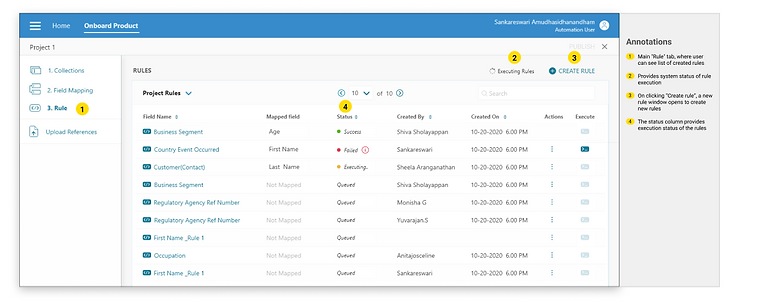
Explained the rationale behind the design with annotations.
-
Provided behavioural spec explaining the features and behaviour of each interaction.